How to Inspect a Pokémon Card eBay Listing Before You Buy
How to inspect a Pokémon card eBay listing before you buy: match the exact card, review every photo, corners, and centering, then confirm the details on eBay.
For buyers who want a repeatable way to review listing photos before opening eBay.
Inspection principles
Start with active auctions and Buy Now listings in one inspection queue.
Open the listing modal to review photos, seller context, and marketplace links together.
Reject listings you do not want to see again once you are signed in.
PokeFocus provides inspection tools and market context. Marketplace purchases, shipping, returns, seller accuracy, card condition, and fulfillment remain your responsibility.
1. Match the card before inspecting the copy
Start with a card you collect. Open a listing in PokeFocus and compare the pictured name, set, card number, language, and raw or graded status with the listing title. Two cards with the same Pokemon can be different printings. A clear photo of the wrong printing is still a mismatch.
- Choose a listing with a visible front and back; count which views are actually available.
- Zoom the card number and set details before comparing price context.
- For a slab, read the label and inspect the pictured card rather than relying on the title alone.
2. Make one observation you can explain
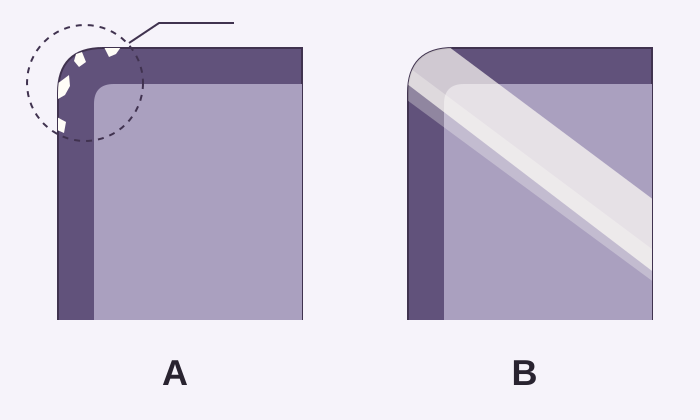
Work through the full image, border balance, then all visible corners. In the illustration below, the left example has a localized white interruption at the edge; the right has a broad reflected band. Those deserve different follow-up: compare another angle rather than calling every pale patch damage.
- Use corner views and zoom to locate a detail, then return to the full original photo.
- Compare the same spot across photos when available. If it stays hidden, record uncertainty rather than assuming it is clean.
- Try a simple conclusion: “I can see uneven borders,” or “I need a clearer back photo.”
3. Decide what to do with the listing
After the photo review, decide whether to revisit the listing, stop considering it, or check the marketplace for more information. Signed-in favorites and rejects preserve your decision; they do not express a public judgment about the seller.
- Reject a listing after inspection when it should stay out of future queues.
- Favorite listings you want to revisit.
- Use hidden seller rules when a seller should be avoided in future Pro workflows.
4. Verify the current marketplace details
PokeFocus shows market data and recent listing facts to help you inspect. The app does not guarantee card condition, seller accuracy, marketplace price, shipping, returns, or fulfillment.
- Verify live price, shipping, and status on eBay before buying.
- Treat market data as a starting point for your own review.
- Use listing photos and seller details before making any marketplace decision.
Common questions
Does PokeFocus buy cards for me?
No. Purchases, offers, bids, payment, shipping, returns, and marketplace disputes happen on eBay or other third-party marketplaces.
Can guests inspect listings?
Guests can inspect public listing examples. Saving favorites, rejects, tracked cards, and hidden seller rules requires an account.
Buyer checklist
- Confirm the listing is for the exact card, set, number, grade, and language.
- Review every available photo before opening the marketplace link.
- Check seller feedback and whether shipping or returns need manual review.
- Reject obvious mismatches so they do not clutter future inspection sessions.
Related resources
Open the product
Try a listing inspectionBy PokeFocus · Updated