Pokémon Card Centering Checker for eBay Listing Photos
Check Pokémon card centering from eBay listing photos: how PokeFocus measures each border, how to read a ratio like 45/55, and when the photo angle misleads.
For buyers who want a cleaner way to review centering from marketplace photos.
Inspection principles
Review centering context while the listing photo remains the primary evidence.
Use zoom controls to inspect border proportions more carefully.
Keep centering review separate from purchase guarantees or grading claims.
PokeFocus provides inspection tools and market context. Marketplace purchases, shipping, returns, seller accuracy, card condition, and fulfillment remain your responsibility.
1. Compare opposite borders, not the artwork
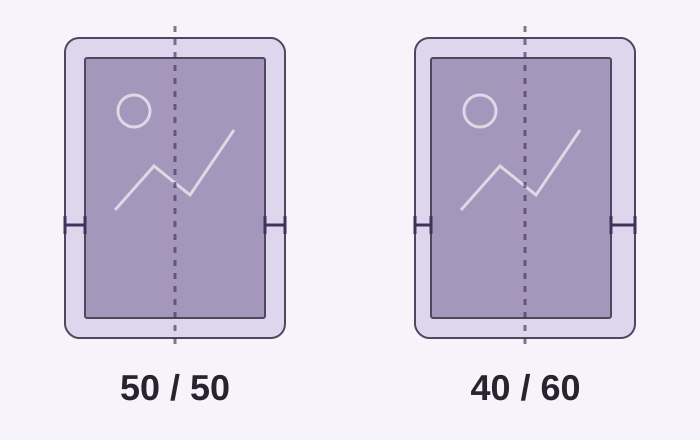
Centering describes how the printed design sits within the cut card. Compare left with right, then top with bottom, using the same printed reference edge on each side. Do not measure from an off-center character or another asymmetric feature inside the artwork.
- For the left example, 20 ÷ (20 + 20) = 50% on each side: 50/50.
- For the right example, 16 ÷ (16 + 24) = 40% on the left and 60% on the right: 40/60.
- Repeat separately for top and bottom. A balanced horizontal pair says nothing about the vertical pair or the card back.
2. Check the photo angle before trusting the ratio
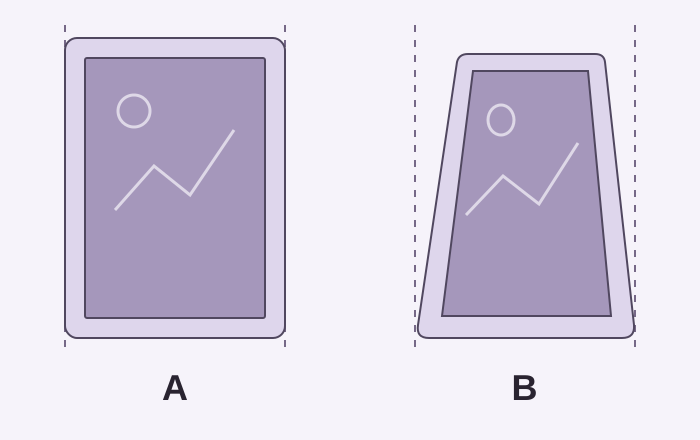
A tilted camera can make one edge look shorter and change the apparent border widths. The two outlines below illustrate why a photograph is not a direct measurement of the physical card. Rotation within a flat photo and perspective from an angled camera are different problems.
- Choose the sharpest photo that includes all four outer edges, with as little camera tilt as possible.
- Compare Original and Aligned views when alignment is available; make sure the selected outline follows the card rather than its sleeve.
- If a border is cropped, reflective, or too blurry to locate, use another photo instead of assigning it a precise ratio.
3. Try the same check on a listing
Open a listing, choose a clear front image, and use the centering tools where available. Check the guide positions against both the outside card edge and the matching printed border. If an automatic outline is misplaced, use the available manual adjustment or choose a clearer image; the displayed ratio is only as useful as those boundaries.
- Zoom in to check each boundary, then zoom out to compare the whole card.
- Repeat for the back if a usable photo is available; inspect corners and surface visibility separately.
- Decide whether you want to inspect further, save the listing, or reject it. Centering alone does not establish grade, authenticity, or condition.
Common questions
Does PokeFocus guarantee centering measurements?
No. Centering tools are inspection aids. You are responsible for your own review before making a marketplace purchase.
Is centering available for every listing?
No. Centering review depends on whether the listing photos are usable and whether the card edges can be inspected.
Buyer checklist
- Confirm the card is fully visible before reviewing centering.
- Review front and back photos when both are available.
- Check whether sleeves, slabs, or photo angle distort the visible border.
- Use centering context as one signal in a broader listing inspection workflow.
Related resources
Open the product
Try a listing inspectionBy PokeFocus · Updated