Pokémon Card Corner Inspection From Listing Photos
Review Pokémon card listing photos with zoom tools, corner previews, and original image access so corner condition is easier to inspect before opening eBay.
For buyers screening listing photos for corner visibility before clicking through.
Inspection principles
Zoom listing photos without leaving the inspection modal.
Switch between full photo review and focused corner views.
Use original marketplace photos when a transformed image hides context.
PokeFocus provides inspection tools and market context. Marketplace purchases, shipping, returns, seller accuracy, card condition, and fulfillment remain your responsibility.
1. Separate a visible edge mark from reflected light
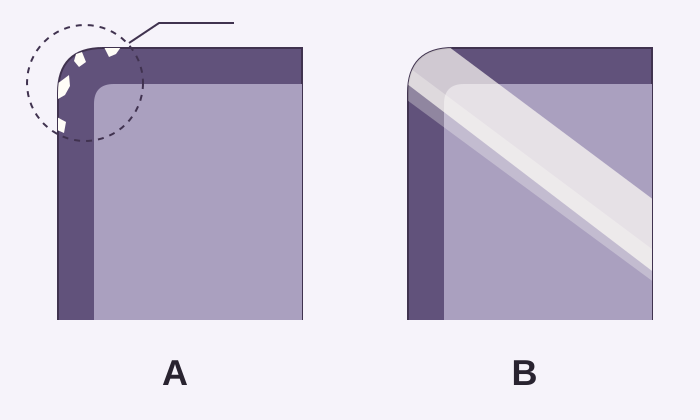
White marks along a colored card edge can be consistent with wear, but a pale patch alone is not proof. A sleeve, strong reflection, dust, or image compression can confuse the read. Start by locating the detail relative to the actual card edge.
- In A, follow the outline: the small pale marks interrupt the colored outer edge.
- In B, the broad light band crosses the surface. The area underneath remains unknown.
- Check a second angle: an edge mark that remains in the same place is more informative than a reflection that moves with the light.
2. Review all eight corners that photos allow
Work clockwise through the four front corners, then repeat on the back. Zoom until the edge is easy to see; enlarging a blurry image further will not reveal new detail. If a finger, sleeve seam, crop, or reflection covers a corner, that corner has not been inspected.
- Start in the full original image so you know which side and corner you are reviewing.
- Use a focused corner view where available, then compare it with the original.
- Keep “no visible wear in this photo” separate from “the corner is undamaged.”
3. Turn missing information into a specific next step
Suppose the front looks clear but glare hides the lower back corners. A useful next step is to open eBay and check for another back image. If none exists, ask the seller there for a sharp, unsleeved back photo in even light before deciding. PokeFocus does not contact the seller for you.
- Be specific about the missing view: for example, both lower back corners without glare.
- Favorite the listing when you want to return after checking the missing detail.
- Reject it if the available evidence does not meet your own inspection needs.
Common questions
Does PokeFocus grade card condition?
No. PokeFocus provides inspection tools and listing context. It does not guarantee grade, condition, authenticity, or seller accuracy.
Why inspect original photos too?
Original photos can show glare, crop boundaries, and seller context that a transformed or focused view may make less obvious.
Buyer checklist
- Review front corners and back corners separately when photos allow it.
- Watch for glare, image compression, and crop edges before judging condition.
- Verify that a graded listing is actually the grade shown in the title.
- Use the marketplace page to confirm the current photo set before purchase.
Related resources
Open the product
Try a listing inspectionBy PokeFocus · Updated